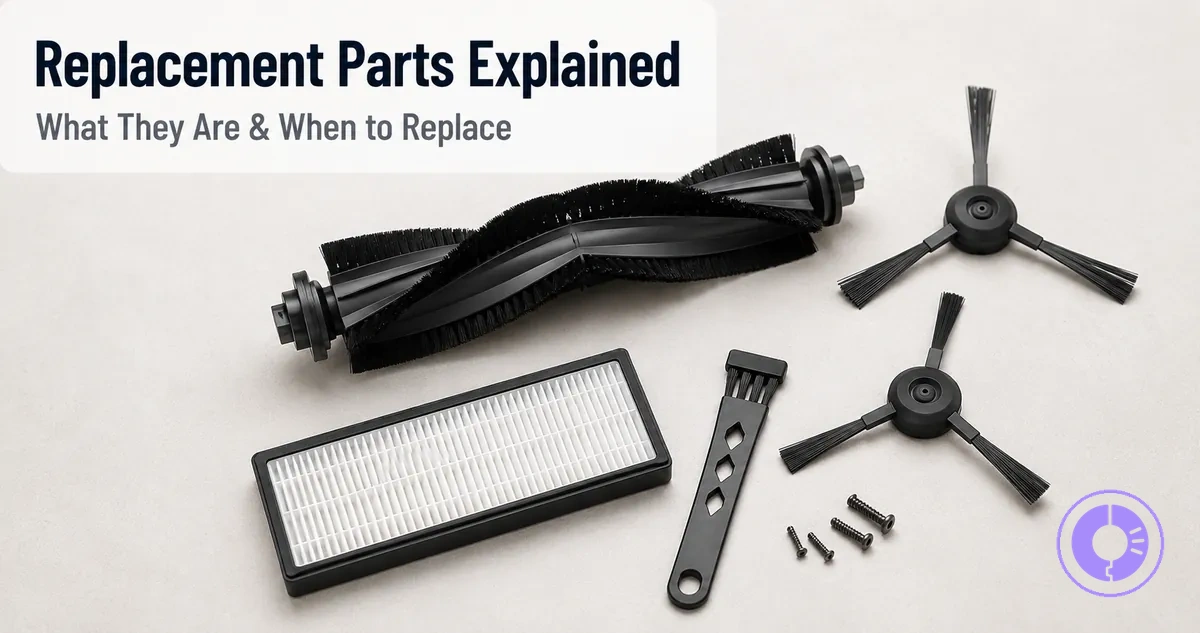
Roomba replacement parts: what they are, what they affect, and when replacement is typically needed
Roomba replacement parts are user-serviceable components that restore cleaning outcomes when wear, deformation, or loss of fit prevents routine maintenance from recovering full pickup, airflow, movement, or runtime. These consumables—such as filters, brushes, and rollers—affect cleaning performance on various floor types. Compatibility with the specific Roomba model determines whether a part fits and functions as intended.
Replacement timing depends on component condition, not on a fixed calendar interval. Observable signs of wear—such as reduced suction, uneven cleaning, or unusual noise—often indicate that a part is no longer performing as intended. What Roomba replacement parts are and when replacement is typically needed comes down to this observation:
- Normal cleaning resolves the symptom – replacement is not yet needed.
- The symptom persists after cleaning – replacement is indicated.
Detailed schedules and troubleshooting for each component appear on dedicated pages; this page provides the overview definition layer. For detailed part-by-part guidance and replacement schedules, visit the Roomba replacement parts hub.
What Counts as a Roomba Replacement Part and What Is Usually Handled Elsewhere
A Roomba replacement part is a component designed to be swapped when wear, deformation, or material fatigue persists after cleaning. These parts are user-serviceable and intended for periodic replacement to maintain cleaning performance. They include items like rollers, filters, and side brushes that naturally degrade over time.
Not every worn-looking part needs immediate replacement; many performance drops are reversible with proper cleaning. Only when a component remains degraded after cleaning—such as a misshapen roller or a filter that stays clogged—does it need replacement.
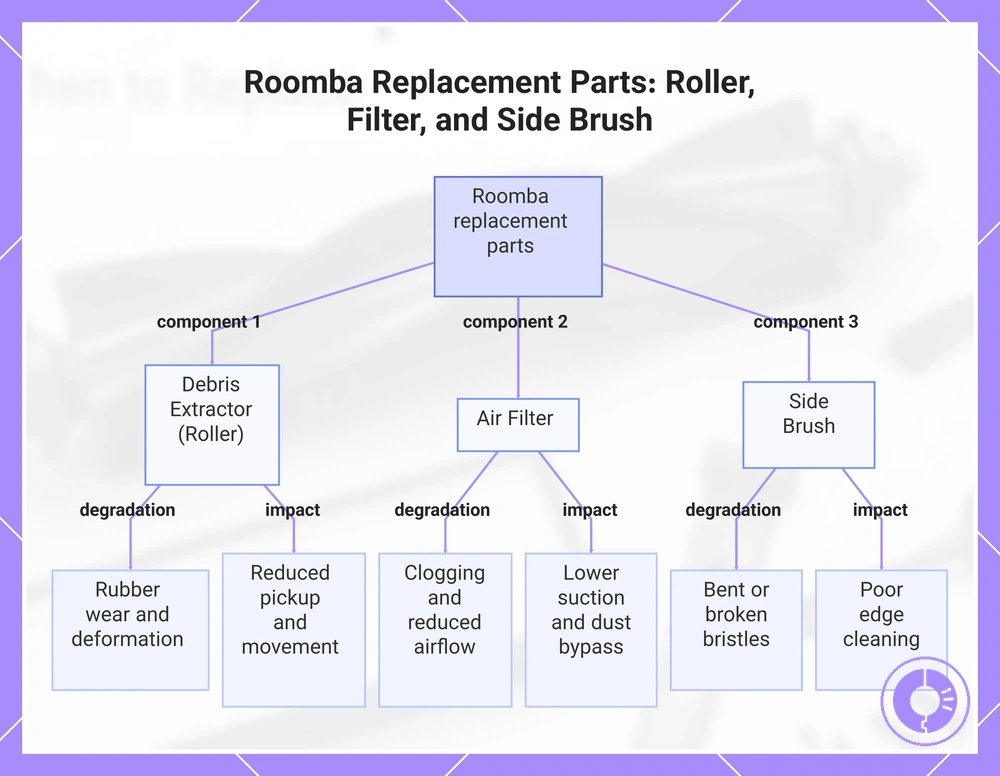
The following list shows what counts as a replacement part and what is usually handled elsewhere.
- Debris extractor (roller): Replaceable. Common degradation: rubber wear and deformation. Performance impact: reduced pickup and movement.
- Air filter: Replaceable. Common degradation: clogging and reduced airflow. Performance impact: lower suction and increased dust bypass.
- Side brush: Replaceable. Common degradation: bent or broken bristles. Performance impact: poor edge cleaning.
- Accessories (e.g., virtual walls, charging cables): Optional add-ons. Not replacement parts; they typically do not degrade from cleaning use.
- Routine cleaning tasks (emptying bin, wiping sensors, removing hair from rollers): Not replacement. These actions restore performance without part replacement.
Do I need to replace this part or just clean it?
You need to replace the part if cleaning does not restore normal performance and the part shows visible wear, deformation, or material fatigue. For example, if a filter remains dark and stiff after washing, or a roller's rubber surface stays cracked, replacement is necessary.
This chart identifies the main Roomba components that require periodic replacement, along with their common degradation and performance impacts.
Replacement parts vs accessories vs cleaning tasks in Roomba maintenance
Replacement parts restore function after physical degradation, accessories add convenience, and cleaning tasks restore function without swapping. When cleaning no longer resolves performance issues, replacement is typically the next step.
| Component | Purpose | Expected Lifespan Behavior | Trigger |
|---|---|---|---|
| Replacement parts | Restore function after physical wear | Used when a component is too worn for cleaning to help | Persistent issues after cleaning often indicate replacement |
| Accessories | Add convenience or extra features | Optional add-ons, not affecting basic function | No trigger; user preference |
| Cleaning tasks | Remove debris, restore function without swap | Routine maintenance; part unchanged | Visible debris buildup without structural wear |
Some items, such as filters or brushes, shift from cleanable to replaceable when material wear appears. At that point, repeated cleaning may no longer restore performance.
Genuine and compatible parts as a meaning boundary, not a buying guide
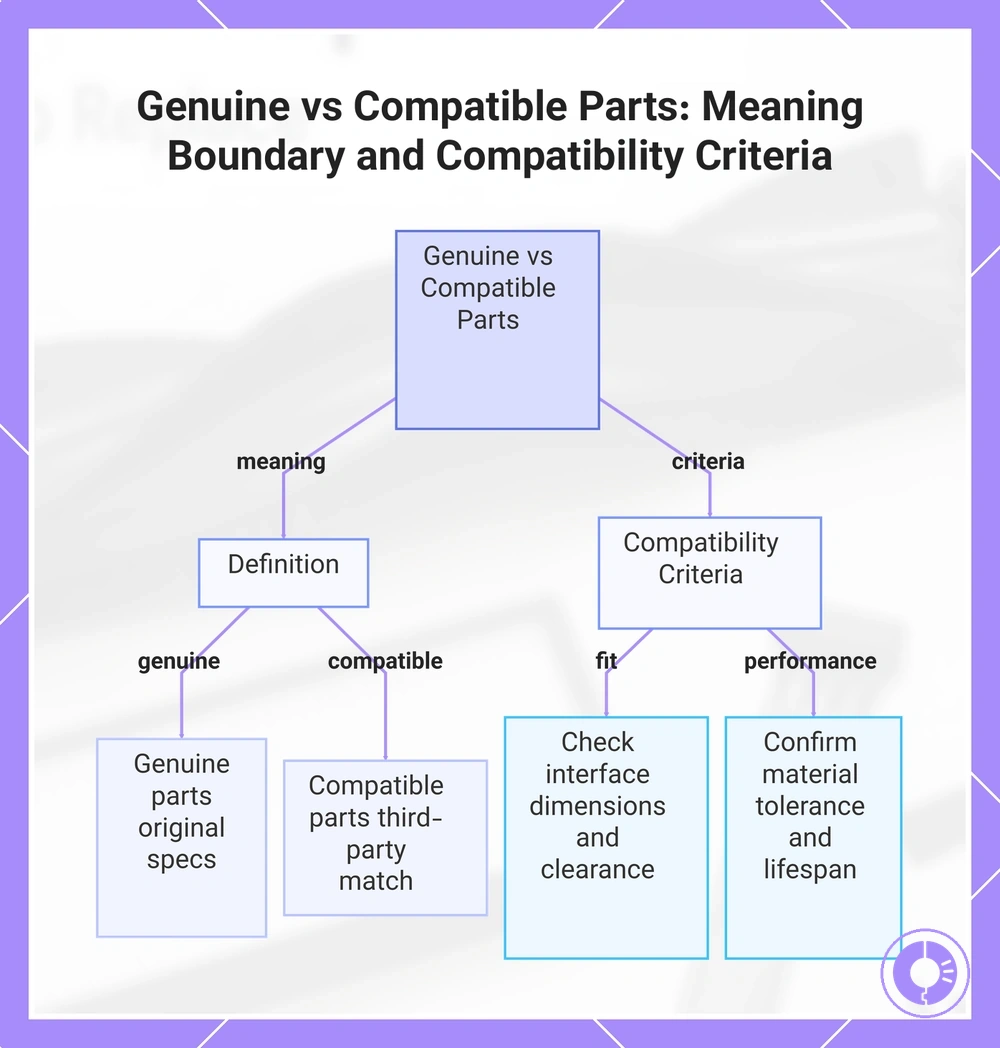
Genuine parts are built to the manufacturer's original specifications, while compatible parts are third-party alternatives designed to match the same fit, function, and durability requirements.
The following criteria outline compatibility requirements as a meaning boundary, not a buying guide. A fuller evaluation of genuine versus third-party trade-offs appears on the genuine vs third-party considerations page.
- Fit checks — verify interface dimensions, mounting alignment, sealing surfaces, and clearance to avoid mismatch risk.
- Performance and durability expectations — confirm material tolerance, contact pressure, and expected lifespan under normal usage.
This chart defines genuine and compatible parts and outlines the key compatibility criteria for fit and performance.
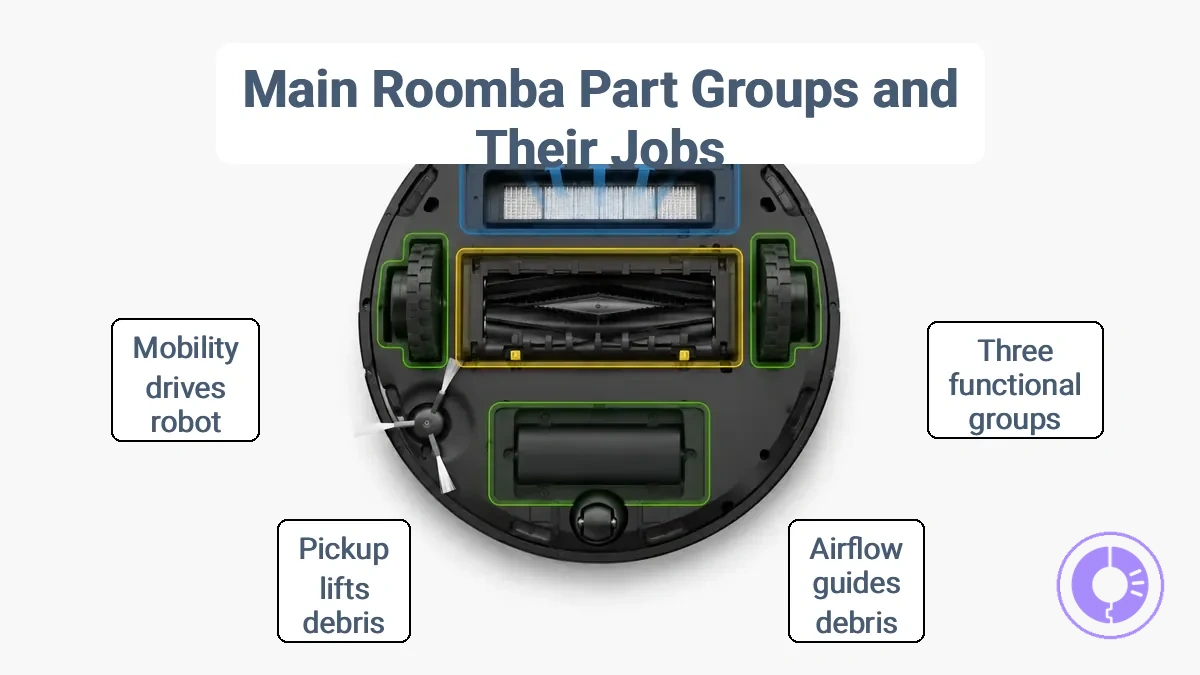
The main Roomba part groups and the job each group performs
Roomba replacement parts fall into three main groups: airflow, pickup, and mobility or power. Each group affects a different function, so a symptom often points to one of them.
The image labels the three functional groups on a typical Roomba, so you can see which parts belong to each job.
Understanding the types of replacement parts shows what each group contains. The table organizes each group's job, common signs, and a first non-replacement check to rule out simpler issues before ordering new parts.
| Group | Job | Common signs | First non-replacement check |
|---|---|---|---|
| Airflow | Guides dust and debris into the bin through filter and exhaust channels | Can indicate reduced suction, visible dust escaping, or filter debris buildup | Remove and clean filter; inspect seal gaps around the bin |
| Pickup | Lifts and directs debris from carpets and hard floors using brushes and rollers | Can indicate missed debris, brush not spinning, or tangled hair or threads | Clear hair or fibers from brush/roller; confirm brush rotates freely |
| Mobility / Power | Drives the robot via wheels and provides runtime through the battery | Can indicate short runtime, uneven movement, or failure to return to dock | Check battery contacts are clean; ensure wheels are not blocked |
This grouping guides diagnosis, not definitive fault. Because symptoms often overlap, checking the simplest possibility first—cleaning a filter or clearing a brush—can save time no matter which group looks involved.
Airflow and dust capture parts that affect suction and exhaust
Airflow and dust-capture parts determine how well the system filters air and moves it through the unit. Restricted airflow often leads to reduced pickup or dusty exhaust, typically from clogged filters or blocked air paths.
- Blocked filters or air paths restrict airflow, causing reduced pickup or dusty exhaust.
- Clogging from fine dust buildup can persist and may reduce suction over time.
- Deformed air paths restrict airflow, which weakens performance at pickup points.
- Dusty exhaust can indicate the filter is not capturing particles effectively, often due to airflow issues.
Agitation and Pickup Parts That Affect Debris Removal on Floors and Carpets
Pickup components agitate and guide debris into the bin, and wear in these parts often appears as missed debris and uneven results.
Signs of wear differ between floors and carpets:
- Carpet: Worn brush bristles or a flattened roller reduce contact with the pile, so embedded dirt and pet hair may remain after cleaning. Tangles around the brush further limit rotation and pickup performance.
- Hard floors: A degraded roller with less surface contact often fails to sweep debris into the suction path. This causes missed pickup near edges and reduces overall edge cleaning.
Mobility and power parts that affect movement, traction, and runtime
Mobility and power parts determine movement stability and sustained cleaning time. These parts include the wheels, caster, and battery. Their condition affects how well the device moves across floors and how long it can operate between charges. Symptoms typically fall into two categories: movement and traction, and runtime and charging.
Symptoms affecting movement, traction, and runtime fall into two groups.
- Movement and traction symptoms: The device may slip on rugs or struggle on thresholds when the wheels or caster lose grip. Reduced traction often appears as hesitations, spinning, or uneven movement. These signs can indicate worn wheel treads or a caster that no longer swivels freely.
- Runtime and charging symptoms: A decline in battery capacity can lead to shorter cleaning sessions or longer charging times. The device may stop prematurely or require frequent recharges. These symptoms may point to a battery that no longer holds a full charge.
Before assuming a part needs replacement, rule out debris buildup around the wheels or battery contacts. Buildup can mimic the same symptoms.
Replacement part sets vs single-part replacements and why the difference matters
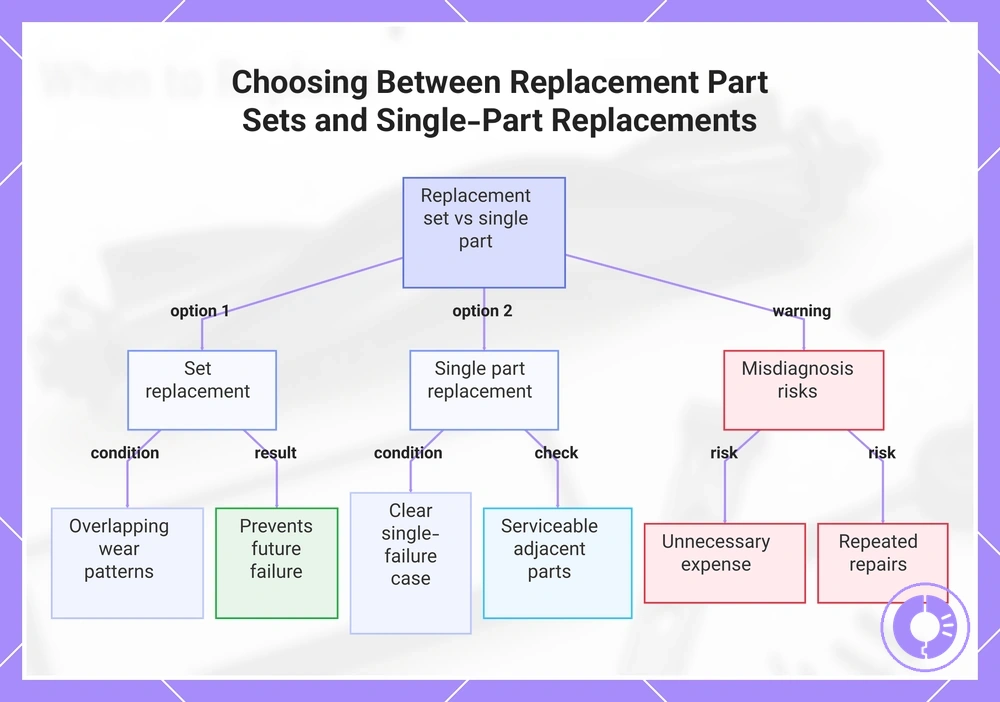
Replacement part sets bundle multiple wear items that often degrade together and typically share a common wear cycle, while single-part replacement fits clear single-failure cases. Replacing them as a group can prevent a future failure caused by an overlooked worn part. Choosing a single part makes sense when only one component shows clear signs of damage and the others remain serviceable. This symptom-cluster approach helps determine whether the underlying issue involves overlapping wear or an isolated defect.
When symptoms appear across multiple areas, a set often addresses the root cause more thoroughly. Replacing only one part in that scenario risks a partial fix, leaving degraded adjacent parts to fail later. The choice between sets and single-part replacements follows a simple criteria split:
- Choose a set when the symptom cluster points to multiple parts with overlapping wear patterns, such as when several related components show similar age or stress.
- Choose a single part when a single symptom points to a clear culprit and you can confirm that other wear items remain within service limits.
Mistaking a single-part failure for a symptom cluster can lead to unnecessary expense, while treating a cluster as a single issue often results in repeated repairs. Proper diagnosis minimizes these risks.
This chart compares replacement part sets and single-part replacements, showing the diagnosis method, criteria for each choice, and risks of misdiagnosis.
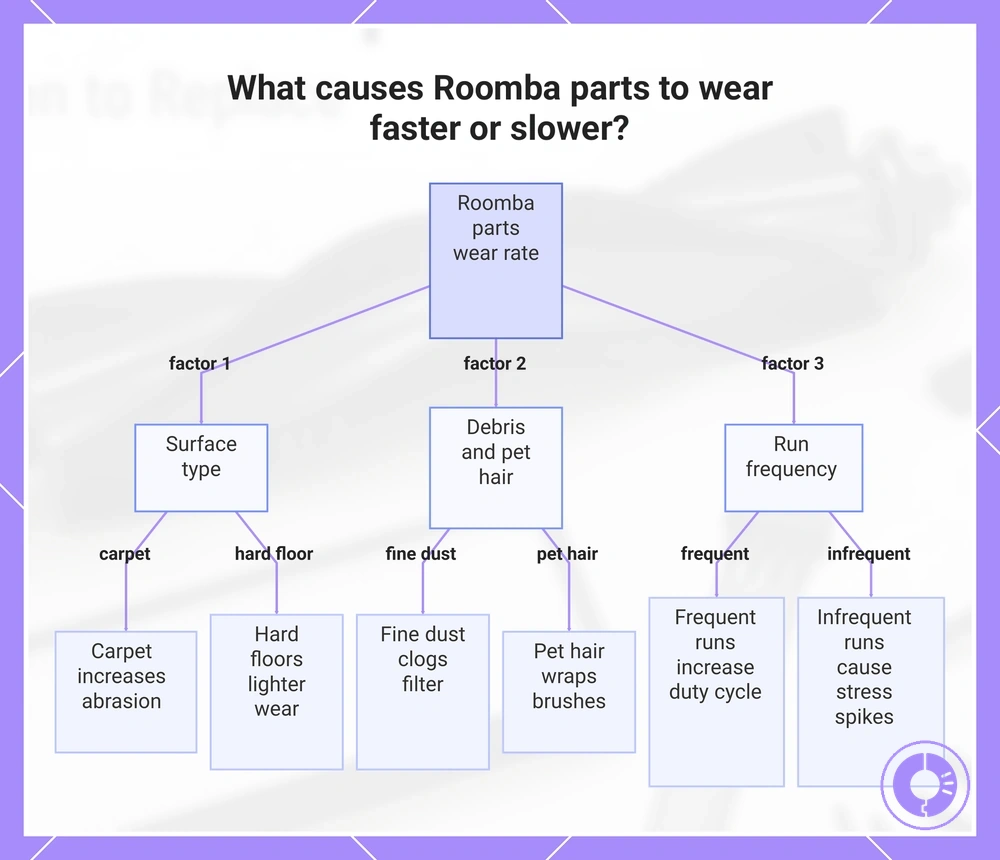
What causes Roomba parts to wear faster or slower
Wear rate depends on surface type, debris composition, pet hair volume, and run frequency—not on a fixed schedule. For example, carpet fibers and pet hair may accelerate brush and roller wear, while light debris on hard floors may allow parts to last longer.
Myth: wear rate follows a fixed timeline. Truth: it varies with cleaning conditions. For instance, a Roomba running daily on thick carpet stresses its brushes and filter differently than one running weekly on tile.
Home environment and usage patterns explain what makes Roomba parts wear faster or slower:
- Surface type: Carpet creates more abrasion on brushes and rollers, especially when thick or high-pile, accelerating brush assembly and cleaning head module wear.
- Debris composition: Fine dust can clog the filter quickly, reducing airflow and increasing motor strain, which may accelerate filter and motor wear. Large debris like pet hair wraps around brushes and extractors, adding resistance and speeding up brush end cap and bearing wear.
- Pet hair: Pet hair can clog the bin and filter, increasing the duty cycle on the brush motor and bin seals.
- Run frequency: More frequent runs increase the total duty cycle on the battery, motor, and brushes, accelerating runtime decline and brush wear compared to infrequent use.
Consider these two scenarios:
- Light debris with frequent runs often leads to steady, gradual wear on brushes and filters.
- Heavy debris with infrequent runs can cause clogging and stress spikes, accelerating sudden component wear.
This chart shows the main factors that determine how quickly Roomba parts wear, based on cleaning conditions and usage patterns.
Surface type, debris type, and pet hair as primary wear drivers
Surface types and debris characteristics are primary wear drivers. Their physical properties cause abrasion, clogging, and entanglement in the robot. Hard floors and carpet produce different stress patterns on parts, while pet hair and fine dust create distinct failure mechanisms.
Each primary wear driver affects specific parts and produces early warning signals.
- Pet hair + tangles → wraps around brushes and rollers → can cause noise or poor pickup; early warning: visible hair strands on brush ends or a change in motor sound.
- Fine dust + clogging → blocks the filter and restricts airflow → reduces suction and can overheat the motor; early warning: the robot empties less debris or the filter appears dark and caked after a short run.
- Abrasive debris → accelerates wear on brush bristles, wheel treads, and edge-sweeper paddles → leaves visible rounding or fraying; early warning: streaks of missed debris along baseboards or reduced edge cleaning.
- Carpet fibers + static cling → increase friction on the brush deck and roller bearings → can cause intermittent stalling on thick pile; early warning: the robot hesitates or reverses more often on carpeted areas.
- Cross-effects between pickup and airflow components → a tangled brush forces the motor to work harder, which can also strain the filter seal and reduce overall cleaning efficiency; early warning: both brush noise and airflow drop appear together.
Usage patterns and environment factors that change replacement timing
Duty cycle changes with run frequency, area cleaned, transitions, and obstacle density. More frequent runs and larger areas increase wear on moving parts. Transitions between floor types and navigation around furniture add stress to wheels and caster.
Classifying the load as light, moderate, or heavy shows how usage patterns change replacement timing.
- Light load: Low run frequency, small area cleaned, few transitions, and minimal obstacles. Wear develops slowly; motors, brushes, and wheels typically last longer.
- Moderate load: Regular use over medium areas with some transitions and obstacles. Duty cycle is balanced; wheel and caster wear is noticeable but not accelerated.
- Heavy load: Frequent long runs over large areas with many transitions and dense obstacles. High run frequency plus collisions from obstacles put stress on drive wheels and caster, which can lead to traction issues and earlier replacement.
General replacement signals that indicate wear beyond normal cleaning needs
Replacement is likely when symptoms persist after cleaning, bin emptying, and visual inspection. The checklist below groups these symptoms into three outcome categories—cleaning results, power and runtime, and movement behavior—to help identify which component area may be wearing out.
Each symptom suggests a likely part group, but overlapping causes are common. Confirming through simple checks can reduce the risk of replacing the wrong component. For a symptom-led approach, see the page on symptoms that suggest a part swap.
The graphic below groups the symptom families for easier identification.
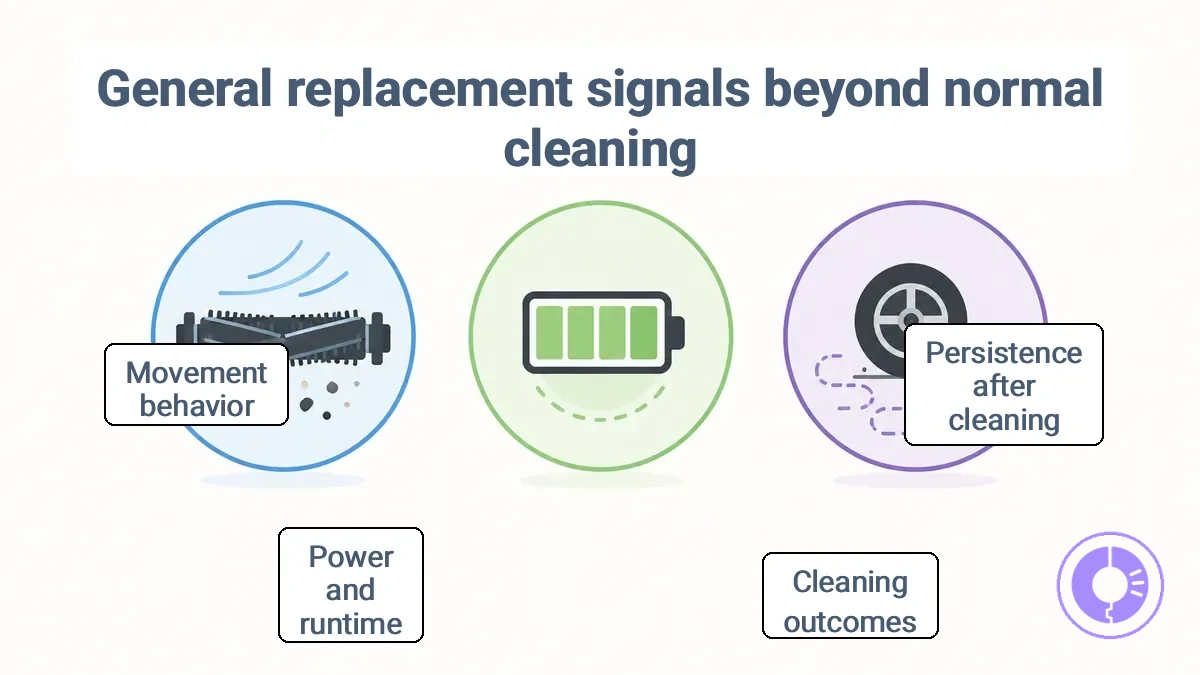
Persistence after cleaning is the key threshold for each symptom. The grouped symptom families are:
- Cleaning outcomes – Symptoms such as missed debris, dusty exhaust, or reduced pickup that persist after emptying the bin and cleaning filters. These can indicate worn brushes, a failing motor, or obstructed airflow.
- Power and runtime – Inconsistent charging, short runtimes, or battery contacts that fail to hold a connection even after cleaning. These often suggest a degraded battery or a faulty charging board.
- Movement behavior – Hesitation, erratic turns, or loss of traction after cleaning wheels and sensors. These may point to worn drive belts, damaged wheels, or sensor degradation.
The next H3 sections map each symptom family to the most likely component areas.
Cleaning outcome signals linked to filters, rollers, and side brushes
Missed debris, reduced pickup, and dusty exhaust often relate to the filter, roller brush, or side brushes after basic cleaning is confirmed. Reduced pickup often results from a clogged filter or a worn roller brush that may no longer maintain full floor contact. Missed debris near corners or edges may point to deformed or blocked side brushes, while dusty exhaust may signal a filter restricted by fine particles. A single blockage in the airflow path can mimic multiple failure symptoms, so rule out a simple obstruction first.
Each outcome signal links to a component group and confirmation check:
- Missed debris – can indicate a worn or tangled brush/roller, or side brushes that are bent or broken. Confirmation check: visually inspect the roller brush for wear or hair wrap; check that side brushes are not deformed and spin freely.
- Reduced pickup – often relates to a filter that is clogged or heavily loaded. Confirmation check: remove the filter and examine it against light; if air passage is visibly blocked, cleaning or replacement may be needed.
- Dusty exhaust – may signal a filter with airflow restriction. Confirmation check: tap the filter gently over a bin; if dust continues to exit during operation, the filter likely requires cleaning or replacement.
Power and charging signals linked to the battery and charging contacts
Shortened runtime and inconsistent charging can reflect a decline in battery capacity or dirty or oxidized charging contacts. Battery capacity naturally decreases over time, reducing runtime. Dirty or oxidized contacts cause intermittent charging and prevent a full charge. Both sources produce similar power and charging signals, so confirming which is responsible requires a few simple checks. Start with the least invasive checks.
The checklist below helps identify whether power and charging signals point to dirty contacts or reduced battery capacity — start with contact cleaning, then check battery runtime.
- Clean the charge contacts on both the robot and the dock to remove any dirt or oxidation that may disrupt the electrical path.
- Confirm the dock is supplying power by observing its indicator light — if the light is absent or erratic, the dock itself may need attention.
- If inconsistent charging continues after cleaning, the contacts may still be degraded; a more thorough cleaning or contact replacement may help restore reliable charging.
- Run the robot until its battery is empty and note the runtime — a significantly shortened runtime suggests the battery can no longer hold a full charge and may need replacement.
- If both contact issues and a weak battery are ruled out, a deeper system-level diagnosis may be needed, but for most cases the problem points to one of these two areas.
Movement and Handling Signals Linked to Wheels, Casters, and Traction
After debris and obstructions are ruled out, slipping, stalling, drifting, or repeated sticking often point to the wheels, casters, and traction components. These movement and handling signals fall into two categories: traction-loss signals and rolling-resistance signals.
- Traction-loss signals — Symptoms like slipping, drift, and wheel spin typically indicate reduced grip from worn tire tread or smooth floor surfaces. To confirm, brush the drive wheel surface and check tread depth. If tread is noticeably worn or the wheel no longer grips on tile, replacing the drive wheel may restore traction. On surfaces like unfinished concrete, tread may wear faster, causing earlier slipping.
- Rolling-resistance signals — Stalling, getting stuck, or jerky movement often result from a binding caster, debris wrapped around the caster axle, or increased floor friction. Confirm by spinning the caster manually; if it does not rotate freely, clean the axle and remove any debris. If the caster remains stiff after cleaning, replacement is likely needed. Debris accumulation can make the caster drag.
Compatibility checks that prevent buying the wrong Roomba replacement part
Compatibility depends on the Roomba model/series and the part's physical interface, not just the part name. The model/series determines overall dimensions and drivetrain compatibility, while the interface includes shape, mounting points, connectors, and sealing surfaces. If either differs, the risk of a misfit increases.
Replacement parts are often grouped by series, but physical interfaces can vary within a series. Confirming the part interface reduces misfit risk—the goal is to avoid a non-working part, not to guarantee performance.
To prevent buying the wrong Roomba replacement part, verify the Roomba model/series and the part's interface features before ordering. The image shows the model label location and the interface features to examine.
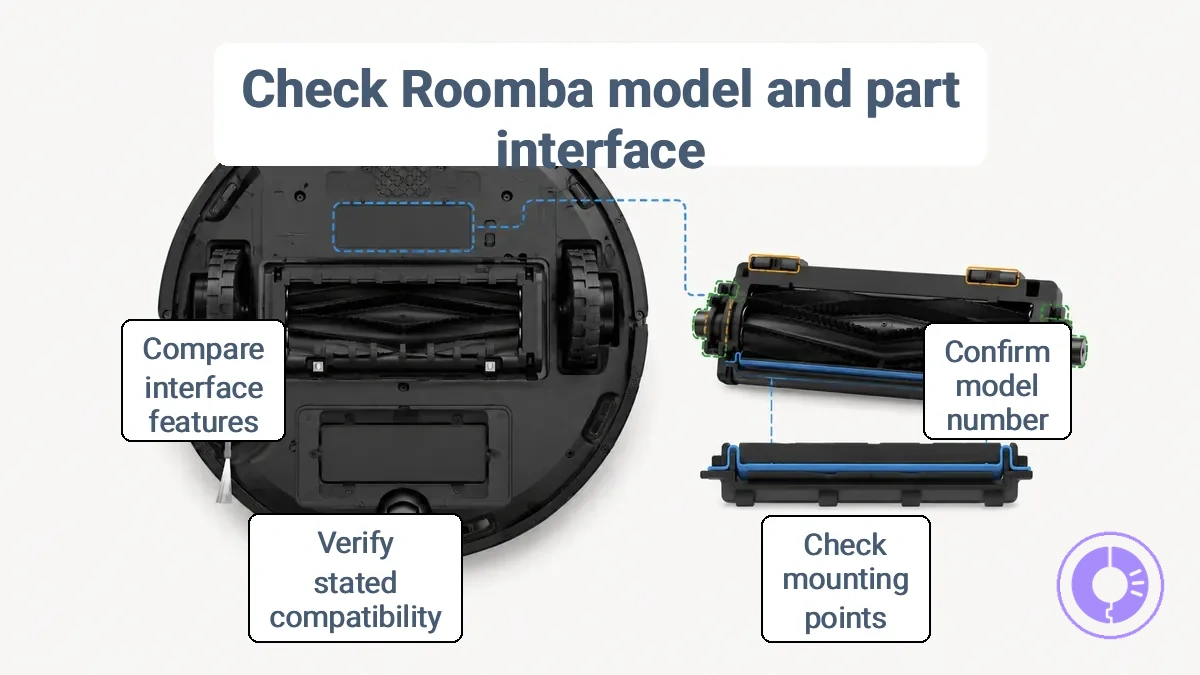
- Confirm your Roomba model and series number (printed on the bottom label).
- Check the part shape, mounting points, and connector alignment.
- Verify the part’s stated compatibility with your model/series.
- Compare the interface features (mounts, sealing, contacts) with the original part.
Q: Will this part fit my Roomba model?
A: The fit depends on matching the model/series and the part interface. Confirm your Roomba model number and compare the physical interface features against the original to reduce misfit risk.
Model and series identification as the compatibility anchor
Identify your Roomba model and series before selecting any replacement part. The model line, series, and visible revision indicators determine compatibility. Locate the product label, usually on the underside of the device or inside the battery compartment. Record these attributes from the label for model and series identification:
- Model line (e.g., Roomba 600, 800, 900 series)
- Series number (e.g., 690, 880, 960)
- Revision or version number, if present
Part shape, mounting, and revision differences that create fit problems
Similarly named parts can vary in shape, mounting points, and connector type, which may block installation or reduce performance even when they appear interchangeable. Mismatches can result from differences in internal geometry or interface design, often leading to poor sealing or intermittent contact. A part that looks nearly identical can still cause sealing problems if its shape deviates slightly from the original mount. The shape, mounting, and revision differences lead to common misfit classes:
- Mount style: The replacement part uses a different bracket or slot orientation than the original, causing misalignment that can prevent the part from seating securely.
- Connector type: Even when the physical connector appears similar, internal pin layouts may differ, which can lead to poor contact and loss of signal or power.
- Dimensions: Slight variations in length, width, or thickness can interfere with adjacent components, blocking proper assembly.
- Alignment: Mounting holes that are off by even a few millimeters can force the part out of position, creating gaps that reduce sealing efficiency.
Maintenance habits that extend part life without turning into a replacement schedule
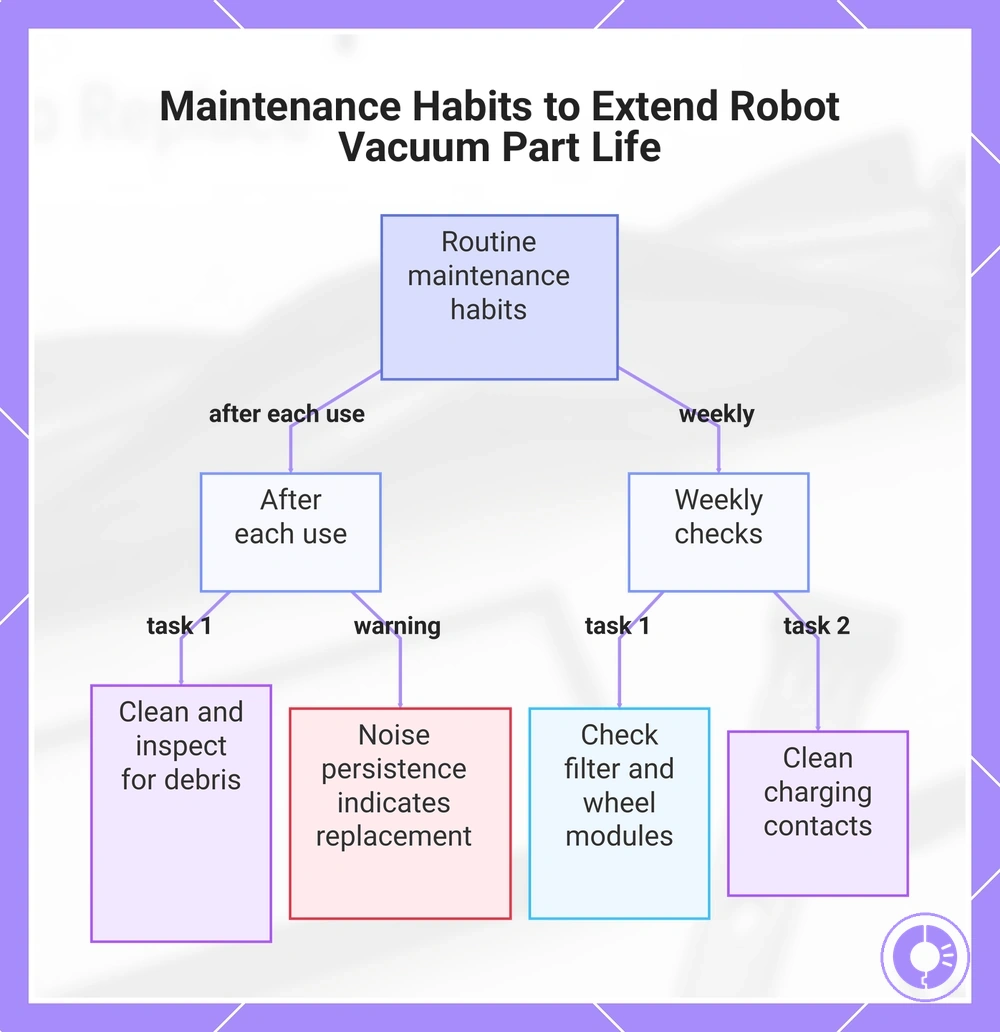
Consistent cleaning and inspection can delay wear-driven replacement but does not prevent eventual part aging. For example, cleaning the brushroll eases motor stress, which helps most when debris is limited; if noise persists after cleaning, the part likely needs replacement.
This checklist groups after-run tasks and weekly checks by frequency to organize these habits. Use it to build a routine that catches wear early without requiring fixed intervals. For a detailed timeline, see the replacement schedule by part type.
- After each use: Clean the brushroll, empty the dustbin, and wipe sensors. Inspect for tangled hair or debris.
- Weekly: Check the filter for clogs, examine wheel modules for obstructions, and clean charging contacts.
This chart groups daily after-use tasks and weekly checks, including a diagnostic warning about noise after cleaning.